 Yogent
安装 Chrome 扩展 Yogent Extension(必装)Install Yogent Extension for Chrome (required)
装上之后,Yogent 桌面应用可以在你自己的 Chrome 里干活(看订单、打面单、采集价格…),用的是你已经登录好的网站。扩展只和本机的 Yogent 通信,不向任何服务器发送数据。
Once installed, the Yogent desktop app can do its work in your own Chrome (checking orders, printing labels, collecting prices…) using the sites you're already signed in to. The extension only talks to Yogent on this computer and sends no data to any server.
以前手动装过(「加载已解压的扩展程序」)的,先移除旧的:打开
chrome://extensions(Edge 是 edge://extensions),找到标着「已解压的扩展程序」、或者 ID 不是 dcofkjmabpigejghfhfcfdibjehcknma 的 Yogent Extension,点「移除」,再按下面从应用店安装。两个同时开着会抢着连 Yogent。安装步骤(不到 1 分钟)
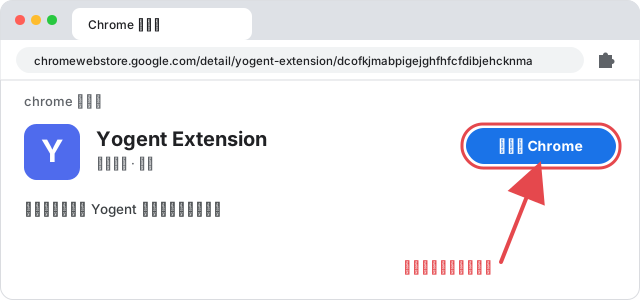
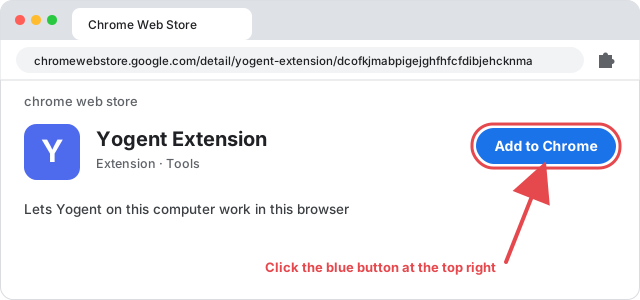
- 打开应用店页面。用 Chrome 打开 Chrome 应用店里的 Yogent Extension,点右上角的「添加至 Chrome」。
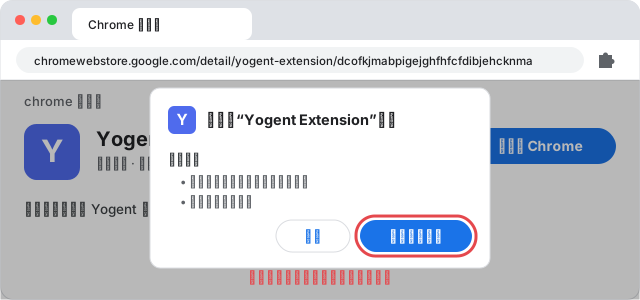
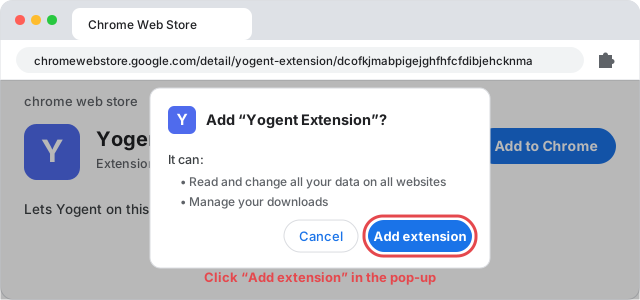
- 确认添加。弹出「要添加“Yogent Extension”吗?」,点「添加扩展程序」。
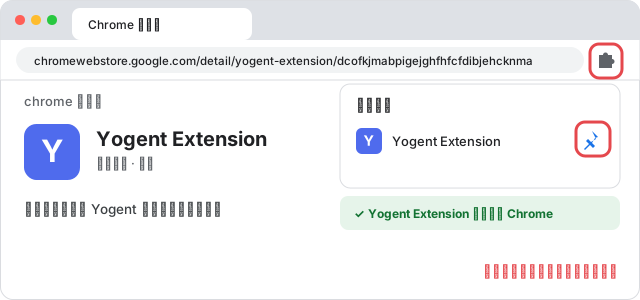
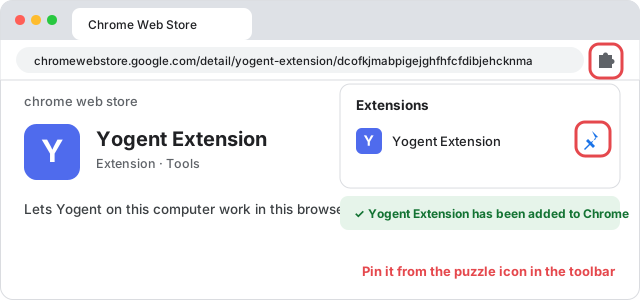
- 完成。右上角提示已添加就装好了。Yogent 开着的时候它会自动连上,不用做别的。可以点浏览器右上角的拼图图标,把它固定在工具栏上,方便看到。
用 Edge?
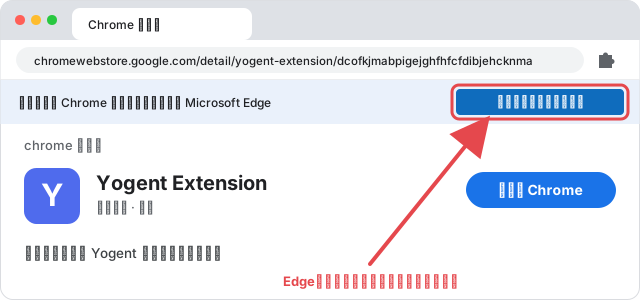
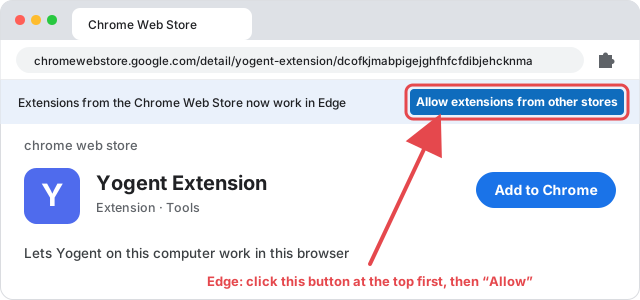
Edge 也能装 Chrome 应用店的扩展。打开同一个应用店页面,先点页面顶部的「允许来自其他商店的扩展」,再点「允许」,然后照上面的第 1~3 步做(按钮上写的还是「添加至 Chrome」)。
应用店会自动把扩展更新到新版本,不用自己下载、也不用点刷新。
常见问题
- Yogent 里提示「浏览器扩展没有连上」?确认 Chrome 开着、扩展是启用状态(
chrome://extensions里 Yogent Extension 卡片右下角的开关是开着的);Yogent 本身也要开着。还不行就把 Chrome 完全退出再打开。 - 扩展列表里有两个 Yogent Extension?把标着「已解压的扩展程序」的那个移除,只留应用店装的。
- 扩展会动我正在看的网页吗?工作流一般在单独开的 Agent 窗口里操作,不碰你正在用的标签页。
- 隐私:见 隐私政策。扩展只连接本机
127.0.0.1上的 Yogent。
Install and open the Yogent desktop app first. This extension is required — Yogent does its work in your Chrome through it.
No Chrome yet? Download Chrome first (Microsoft Edge, built into Windows, works too).
No Chrome yet? Download Chrome first (Microsoft Edge, built into Windows, works too).
Installed it by hand before (“Load unpacked”)? Remove that copy first: open
chrome://extensions (Edge: edge://extensions), find the Yogent Extension marked “Unpacked extension” or whose ID isn't dcofkjmabpigejghfhfcfdibjehcknma, click Remove, then install from the store below. Two copies running at once fight over the connection to Yogent.Install (under a minute)
- Open the store page. In Chrome, open Yogent Extension on the Chrome Web Store and click Add to Chrome.
- Confirm. When asked “Add ‘Yogent Extension’?”, click Add extension.
- Done. It connects automatically while Yogent is running. You can pin it from the puzzle icon in the toolbar to keep it in view.
Using Edge?
Edge can install Chrome Web Store extensions too. Open the same store page, click Allow extensions from other stores at the top, confirm with Allow, then follow steps 1–3 above (the button still says “Add to Chrome”).
The store keeps the extension up to date automatically — nothing to download or reload.
FAQ
- Yogent says the browser extension isn't connected? Make sure Chrome is open and the extension is enabled (the switch on the Yogent Extension card in
chrome://extensions), and that Yogent itself is running. If it still isn't, quit Chrome completely and reopen it. - Two Yogent Extensions in the list? Remove the one marked “Unpacked extension” and keep the store version.
- Will it touch the page I'm looking at? Workflows normally work in a separate agent window and leave your own tabs alone.
- Privacy: see the privacy policy. The extension only connects to Yogent on
127.0.0.1.